Showing posts with label apps. Show all posts

Wednesday, March 25, 2015

Learning about fractions

We have been learning about fractions and how they must be shared "fair and square". In first grade, we specifically work on halves and fourths. We learned that every time you fold a paper in 1/2 that the pieces you create double. For example is your paper has 2 equal part and you fold it again for another 2 equal parts you will have 4 equal parts. We use the ditty, "double, double, half, half" to help us remember this. Ask your child to share the ditty with you as well as the hand actions that we use to show it.

Screenshot of Pizza Fraction app
Here is a link to one of the fun and FREE apps that reinforces fraction knowledge. Pizza Fractions

You could also use the FREE Geoboard app and have your child make a particular shape and then have them "cut" it into half or fourths. Or practice our "double, double, half, half" routine.
Geoboard app icon

Another great way to reinforce fractions with our child and one of the concepts that can be tricky is to draw a number of object such as 12 hearts and then have your child loop 1/2 or 1/4 of the shapes.

Wednesday, October 8, 2014

Number lines and counting on

As you know, we have been working on the counting on strategy during math over the past week. Today we focused on counting on on a number line up to 20. After doing a couple of problems together on the SMARTboard, I wanted to give everyone a chance to actively participate, so we took out our iPads and used the free app, Number Line. For each problem, students circled our starting number, made their "bunny hops" for counting on and then showed the mathematical number sentence by writing it above their work.  Using this app kept everyone involved and engaged in our learning and in my opinion, truly helped us to grab onto the concept as we were able to visually represent it and then use that representation to create our number sentences.

Literacy Apps and Websites for your K-2 child

Click image above to go to presentation
For those not able to attend our Fall Literacy Night, please feel free to click on the image above to see several apps and websites that you may find helpful for your K-2 children.

Wednesday, February 5, 2014

Skitch'in penguins

We have been wrapping our unit on informational writing this week by studying penguins. Kiddos spent some time working with a partner to read the National Geographic eBook, Penguins. While they were reading they took notes on interesting facts. We then used these notes to create an informational paragraph about penguins. 
We are now using our paragraphs to create a digital version of our research. Yesterday, we used the Pics4Learning site for copyright-free images of penguins. We then imported our images into an app called, Skitch where students then labeled various features of penguins. We will be inserting this diagram into our Doodlecast story. Be on the lookout for these to be emailed to you sometime at the beginning of the week.

Wednesday, January 15, 2014

Which number is greater?

In math we have been working on understanding that numbers are made up of 10s and 1s. We have been building numbers and now are comparing numbers with our concrete models so we can visually see how 32 is larger than 17. This seems like a very basic concept for us, but for children, numbers are often very abstract and although they may know that the number is larger, they may not realize why.

We have been using base 10 blocks and cubes to show numbers but have also been using virtual base 10 blocks (Number Pieces Basic which is a free app) and also drawing representations of the blocks with a drawing app (MaxDoodle)  on the iPad. You can see representations of both in our pictures.

Today kiddos had to represent numbers and also prove how they knew one was larger than the other. They could choose how they wanted to show it. It was great to see them take ownership not only of their learning but of how they felt most comfortable showing what they knew. As we finished, kiddos had the opportunity to come up and explain their thinking. I am excited by the growth I am seeing not only with everyone's ability to show what they know and explain their thinking but also with their use of technology and choosing the right tool/app to do the job.


Friday, January 3, 2014

Indoor recess fun

Ugh!!  This cold weather is driving us crazy! Indoor recess is always fun but after being cooped up for a couple of days it can grow old quickly. From the looks of the forecast, we'll be indoors for awhile yet so we are making the best of it.

Today, the kids from Mrs. Birr and Mrs. Skinkis' classes joined us for recess. We used the free app called, The Electric Company Party Game: Lost on Prankster Planet.  This is a great multi-player app that has students complete physical challenges, wacky challenges, counting races, and math questions. Kiddos have to draw, discuss, think, act, and problem solve to make their way through the digital game board. Here's an example of one of the wacky challenges.


Here are a few pics of the kiddos using the game with their groups. The room was totally engaged but was quite noisy with all of the laughter and acting going on.  


Wednesday, December 4, 2013

Techie Sight words

We have finished reviewing the kindergarten sight words and are now working on the 45 first grade words. One of the ways in which we are practicing our words is with magnetic letters, but not just any magnetic letters, we're using an app called, Magnetic ABC. Each week your child will have the opportunity to make their words on this app using a sheet like you see below. We will be creating our own sight word slide shows with our creations later in the year.

Monday, November 4, 2013

Randomness

We've been working hard on telling time to the hour on both digital and analog clocks during math. Kiddos are doing a very nice job with this concept. Try to reinforce this skill at home by asking them what time it is when the time is close to an "on hour" time.  We played a fun matching game last week where each student was given a digital, analog or written time and they had to roam the room to find their matching time partners.

During our social skills time with Mrs. Olson we have been learning about big problem/little problem and how to use our Super Flex strategies. Today we learned more about Rock Brain, an Unthinkable. A Rock Brain is someone who gets stuck in their thinking and are unable to move around a problem. We made our very own Rock Brains today which the kiddos are excited to bring home and share with you... although not quite yet as we need them at school to help with our learning yet.

After we learned about Rock Brain and Superflex we used an app called, Sock Puppets to tell about what we learned. This is a great app for helping kiddos to share what they learned in a fun and engaging way.


Sunday, September 22, 2013

Apps

We have been starting to use our iPads to enhance our learning at various times during the day. Below are a few of the apps that we have been using in the event that you would like to add them to your personal devices.

Subitize Tree - This app helps students to be able to "see" numbers quickly. This app has become a class favorite and has several levels and items to choose from when subitizing. 
Research has shown...
* that there is a strong relationship between subitizing skills and math achievement in the early grades.
*Subitizing supports addition (counting on) and subtraction (counting back)skills.
*Subitizing supports fluency in more than and less than skills.
*Subitizing supports fluency in recognizig visual patterns
*Subitizing support mathematical speed and accuracy.


Letter School is a fun app to help with handwriting. In the settings you can change the handwriting type to HWT (Handwriting Without Tears) which is the style of writing our district teaches kindergartners. One of the aspects I love about this app is that it provides the student with a gradual release- it starts by showing students how to make the letter, next it helps them through the process and last students do it on their own from memory. I have used this app for a couple of years now in addition to our paper and pencil practice and the kids really enjoy it.


Word Bingo- This is fun app to help students with their sight words. You can also find this game online at ABCya.com 

Wednesday, March 6, 2013

Happy Birthday Dr. Seuss!

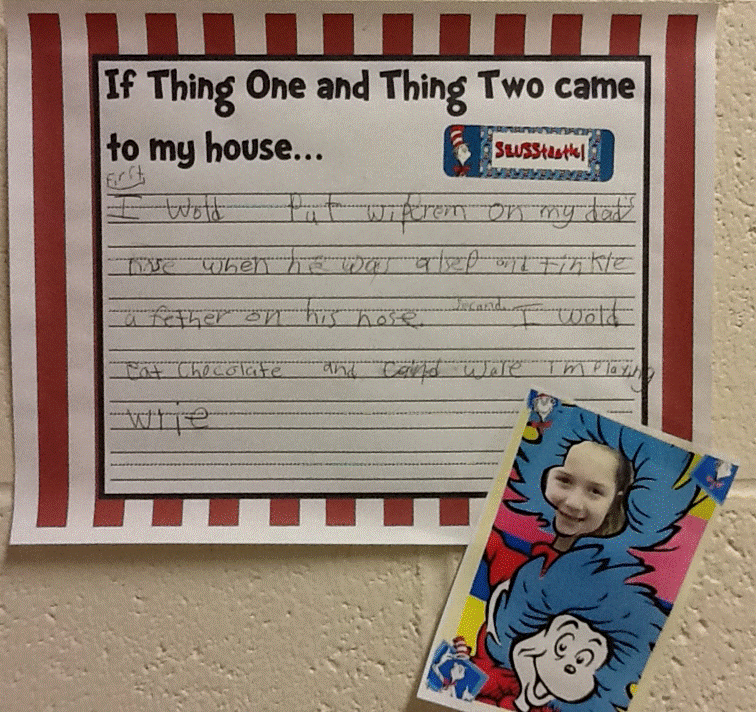
We've been working on writing a creative paragraph on what would happen if Thing 1 and Thing 2 from The Cat in the Hat story came to our homes. We have come up with some pretty zany ideas (be glad, be VERY glad that they won't be stopping by!) We will have our paragraphs out in the hall for you to enjoy when you come to conferences next week. As we finish them up, I will also take pictures and get them on the blog for you to enjoy in case you are not able to come, have already come, or want to share with other family members.
We also used an app by Ocean House Media called, CatCam to take a picture of ourselves as Thing 1 or Thing 2. The kids really got a kick out of this! If you are interested in this app, it is on sale right now for FREE! It is usually a $1.99 so hurry and click the link above as I believe it is only on sale until next week.  If you choose to download this onto an iPad please know that it is an iPod app so you will need to touch the 2x button to enlarge it.

Guess Who?


Wednesday, February 27, 2013

Number Stories Tech'd Out

This week in math one of our learning targets has been to create and solve number stories. We used an app called, DoodlecastPro to help us show our learning for this target. Doodlecast Pro  is an app which allows us to record ourselves while also recording our writing and drawings.

After learning about the 3 main parts of a number story (numbers, words (story), and a question), students were given 2 numbers and a bag of manipulatives. With their partner they had to show their numbers with their manipulatives and come up with a story to match. They then recorded themselves and also added the number sentence to match. The results were phenomenal and compared to the math journal version, this was sooooooo much more engaging. I can see where kiddos will definitely remember this vs. black and white, uninteresting page in our math journal. 
See below for most of the teams' Doodlecast Pro video

Wednesday, January 23, 2013

Spelling and technology

Last week we officially started spelling. As you have seen, your child's spelling list will come home each Monday in their DOG binder. Here at school, we keep an identical list to help us practice, but we have also been using a free app called, A+ Test by Alligator Apps. Each week in addition to writing our spelling lists on paper, we also add our spelling words to the iPad app by typing them in and also recording them with our own voices! There are then 4 different practice sessions that the kiddos use on various days of the week. On Fridays when we take our test, we will use our iPads. The app will read each word to the student, they will then write it on their spelling paper and then enter it onto the iPad. In this way kiddos are still making the transfer of spelling to the written word and practicing their handwriting at the same time, but are also getting practice with their keyboarding skills and how words "look" on the computer. As adults, we often take for granted the simple things such as: when we write we use lowercase letters, however, on the computer the keys are all in caps which can be confusing for our youngest learners. 
After finishing their test, children then send their test to me via email directly from the app which gives me a digital record of their errors which I can track over time if needed. 

Saturday, October 6, 2012

Looking for apps?

Here are some of the apps that we are currently using during our word work time and during our math workshop. These are all great apps to help your child with basic sight words, beginning sound discrimination, basic math facts, and even handwriting. Click on the links to go directly to iTunes. Cost for most of these is 99 cents to $1.99. PopMath Lite is free. 


http://itunes.apple.com/us/app/teachme-1st-grade/id355940964?mt=8


Wednesday, May 2, 2012


We learned how to use a new app today called, Rocket Math. For those of you with iPods/iPads at home, this is a great app to help with various math skills including addition and subtraction, even/odd numbers, money identification, time, patterns, and so much more. There is also a free version that does not include as many levels/missions in case you'd like to try it out first. The full version is only 99 cents.


This morning we also spent some time talking with our Skype buddies in Texas as well as our buddies in Mr. Jarock's high school math class. 
We found out from our Texas buddies that they received their eggs. They are going to be hatching chicks and are going to bring us along on the adventure! Today we got to see one of the eggs. It didn't look at all like what we had thought. We also learned that the eggs they will be incubating are not the kind that we would eat for breakfast as they are fertilized, which means a chick is inside. Mrs. Christian explained this as being that the egg had all the right parts for it to turn into a chick and that the ones in the store are unfertilized- so no need to worry about breakfast (or brunch for lunch as we had eggs today for hot lunch)


We had fun with Mr. Jarock's math class as we asked them last week if they would like a whole candy bar or a half of a candy bar based on a lesson that we did as an intro to fractions. I had asked the kiddos last week if they wanted a whole cracker or a half of a cracker. Those that wanted a whole one got an oyster cracker while those that wanted a half, got 1/2 of a graham cracker. We discussed why this wasn't fair and talked about how fractional parts need to always be fair and square and divided equally. We then played the same "joke" on Mr. Jarock's class. Everyone in the class, except Mr. Jarock wanted a whole candy bar (of course!) so we sent them treat sized Kit Kats while Mr. Jarock got a full-sized candy bar that he was able to break in half for himself. We've been learning a lot from each other! The seniors recently wrote us letters as well and then we wrote back. I even heard that one of the Skype buddies met at a ball game the other day. Cool!  We have letters again and our buddies sent us some math problems to figure out this time. We're excited to read them, figure out the problems and send them back.


Til next time.... Have a great week


Oh, don't forget our Spring Concert with Randy Peterson is this Friday from 1-2:15. Should be a fantastic show!! Hope you can make it!!!!

Saturday, March 10, 2012

Our Putt Putt hole

Here are a few pictures of our hole, "The Lucky Leprechaun" that I put together in an app called, Pic Collage. This is an app that the kids will be using the week after spring break for an activity/assessment. More on that soon.

Click the link below to see pictures of the other holes. Of course the pictures don't show the true ambiance of each hole, but you'll get an idea what it was like. Hopefully, we'll do it again next year!

Monday, March 5, 2012

A Seusstastic project

We worked on a special writing/technology project for Dr. Seuss' birthday. 
We started by using the iPad ebook app, The Cat in the Hat which we watched together on the Smartboard. We then talked about the book and what we would do if Thing 1 and Thing 2 would happen to come to our homes (YIKES!)


We then wrote about our ideas on this cool paper which I found on the Seusstastic Classroom Inspirations blog.

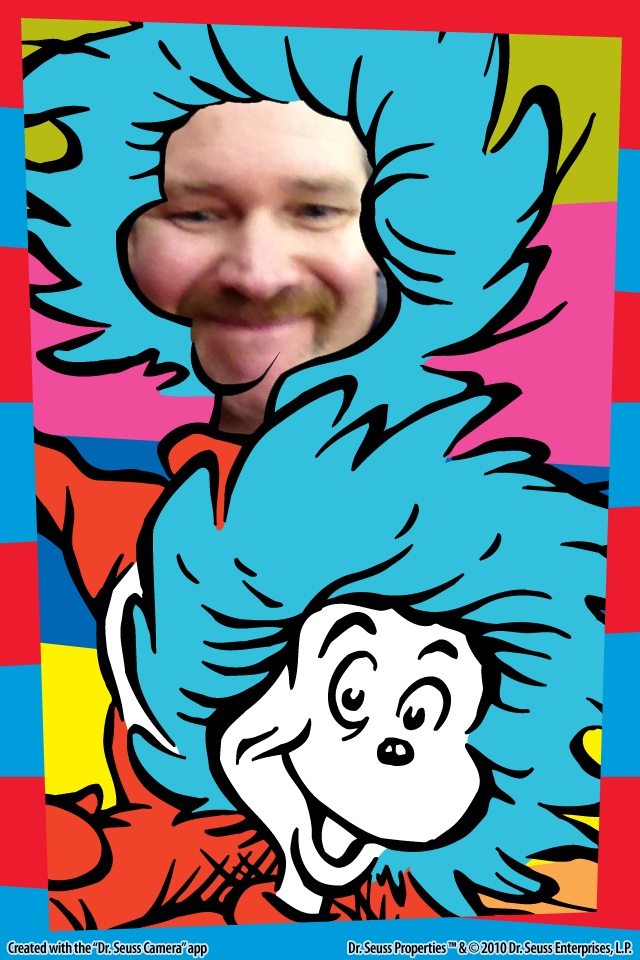
We then incorporated a bit of technology by using another iPad app called, Dr Seuss Camera
This app has 16 backgrounds to choose from all based on Dr Seuss' artwork. There are several backgrounds from The Cat in the Hat and two in particular of Thing 1 and Thing 2. The kiddos got to pick one of those 2 and then had a friend take their picture which they inserted into the face hole on their background.

Once they did this, they moved, rotated, and scaled their photo to fit how they wanted it and then put finishing touches to their picture by adding crazy borders and stamps.

Next, each kiddo saved their masterpiece to the photo library (in case of glitches) and emailed it to me. We then printed off our images and attached them to our stories and will be displaying them in the hall. Next time you're in the building, stop by and take a peek.

Tuesday, February 21, 2012

Fact families meet technology

Have I ever said, "1st graders rock?!" Well if not, let me tell you what we did on Monday that knocked my socks off! 


Last week we learned about fact families. I used the house format below to introduce the concept. This week I wanted to see if the kiddos grasped the concept, but I also wanted to embed some of our technology standards into this review.. so here's what we did...

First, I sent everyone an email with the picture to the right.
After reading my email, your child had to:
  1. Save the image to their photos
  2. Then they had to open up their Doodle Buddy app.
  3. Once in Doddle Buddy, they needed to retrieve this photo to use as their background image
  4. Next, they had to fill in the fact family problems
  5. Finally, they had to email me their completed project.

An example of a finished product

All of this took us about five minutes. I was absolutely amazed!!


First graders ROCK!!!!!

Thursday, January 26, 2012

Math ninja

Today the kiddos were introduced to new app called Math Ninja. This is a fun app to help kids learn their basic facts. You can set it up to practice any or all of the basic facts (+ - x / ) the game is set up as a story and each chapter gives you new challenges. This was definitely a hit today. I'll be curious to see how it affects our learning over the coming days/weeks.
For those of you interested in the app, there is a free version and a paid version. We are currently utilizing the free version at school. I have the full version at home for my son and the only difference I have noticed so far is that the paid version has more levels. We'll see how far the kiddos get before we purchase the whole thing.
If you try this app out, let me know what you think.

Saturday, December 3, 2011

iPod update

This week we have some good, bad, and exciting
things happening with our iPod Touches.

The good news is that all of our iTouches are now restored and backed up to look the same no matter which iPod you have. This will be a great help for all as we begin to use them more and more.

The bad news is that all of our previous information has been wiped clean with the restore, so off we go to earn back the levels that we were on.

The exciting news is that we will have email addresses through our iTouches as of Monday. My intent is for your child to be able to email me their creations from their iPod. One of the goals of our model technology classroom is to be able to create and collaborate and this will allow us to do just that. I will have tight control of this and your child will have limited access at this time- they will be able to email me and you at this time.

I know that some of you have iPods or iPhones or iPads at home and are looking for good apps for your child. Below are just a few of the ones that we are using at school that you may want to add to your devices at home.

Teach Me 1st:  A comprehensive app that reviews spelling, sight words, addition and subtraction facts with your child. It allows your child to earn "coins" to spend at the store as they master content areas. The price is usually $1.99, but currently it is 50% off. You can have up to 4 players registered for this app. This developer also offers Teach Me Kindergarten and Teach Me Toddler for your younger children. I have used both with my younger son and have found all of these to be great!


Math Bingo by ABCya is a fantastic app that combines math skills with a good old-fashioned game of bingo. You begin by choosing the math skill you want to focus on and the level of difficultys another of our favorites that we use to practice our addition and subtraction facts. This app is currently is 99cents in the iTunes store and is available for iPod and iPad.


Yet another app for addition and subtraction fact practice,Pop Math Lite . We are going to begin using this one this week. It is free in the app store and is available for iPod and iPad.